Key takeaways
- Five one-handed gaming keypads compared for PC and console play: analog optical keys, a Hall Effect thumbstick, hot-swappable switches and macro keys.
- Quick Answer
- 1. Razer Tartarus Pro Gaming Keypad
- 2. Azeron Cyborg II Gaming Keypad
- 3. Razer Tartarus V2 Gaming Keypad
- 4. HORI Tactical Assault Commander Mechanical Keypad
- 5. Redragon K585 DITI One-Handed Gaming Keyboard
- How to Choose a Gaming Keypad
- Who Should Skip a Gaming Keypad
- FAQ
- Conclusion
- Product and ASIN Reference
A gaming keypad moves your movement keys, abilities and macros under one hand, so your mouse hand never has to leave its aim to reach across a full keyboard. The five keypads below cover the main ways of doing that: analog optical keys that read how deep you press, a 3D printed frame built around an analog thumbstick, mecha-membrane keys, a Sony-licensed console keypad, and a budget mechanical board with the most keys of the group.
They differ most in switch type, thumb control and software. Two use Razer’s 32-key layout with an 8-way thumbpad, one replaces the thumbpad with a true analog stick, one is built for PlayStation first, and one keeps a near-keyboard layout. All five are wired and fully programmable.
As an Amazon Associate, we earn from qualifying purchases.
Quick Answer
The Razer Tartarus Pro is the best gaming keypad for most one-handed players: its analog optical keys offer adjustable actuation, rapid trigger and a second function per key. The Azeron Cyborg II adds a true analog thumbstick and a hand-fitted frame. The Redragon K585 DITI is the budget pick, with 42 hot-swappable mechanical keys.
1. Razer Tartarus Pro Gaming Keypad

The Tartarus Pro is the premium pick, and its analog optical switches are the reason. Each key registers how far it travels, so actuation can be set anywhere from 1.5 to 3.6 mm, a light press can trigger one command and a full press a second one, and rapid trigger resets a key the moment it starts to rise. In games with controller support, the keys also feed analog input, giving graded movement instead of an on-or-off press.
The layout matches the Tartarus family: 32 programmable keys in a grid, an 8-way thumbpad and a 3-way scroll wheel, plus a side button that cycles eight keymaps. Razer Synapse handles remapping, macros and per-key Chroma RGB lighting, and the palm rest adjusts between two positions. It only makes sense for PC players who will program the dual-function keys; everyone else pays for features that sit unused.
Specs
- Switch type: Razer Analog Optical Switch (linear)
- Actuation: adjustable, 1.5 to 3.6 mm, rapid trigger, dual-function presses
- Keys: 32 programmable, including 8-way thumbpad and scroll wheel
- Profiles: 8 quick-toggle keymaps, set in Razer Synapse
- Backlighting: Razer Chroma RGB, per key
- Connection: wired USB
- Palm rest: adjustable, two positions
- Dimensions: 5.95 x 7.96 x 2.5 inches
- Weight: 12.8 ounces
- Model number: RZ07-03110100-R3U1
- Price tier: premium
2. Azeron Cyborg II Gaming Keypad

The Cyborg II takes the opposite approach to the Razer layout. Instead of a flat grid, it is a 3D printed frame of finger towers that adjusts to your hand, with 30 programmable inputs placed where each finger naturally rests. Every input is wired individually rather than through a scanning matrix, and the Azeron software maps them as keys, gamepad buttons, mouse clicks or macros.
Its defining control is the Hall Effect analog thumbstick. Because it reads position magnetically, it does not develop stick drift, and it can output WASD-style key presses or smooth 360-degree analog movement, with adjustable angle, dead zones and sensitivity. The trade-offs: the frame is printed PLA and PETG rather than molded plastic, the fit suits medium to larger hands, and the warranty runs one year. For players whose main complaint is the thumbpad on a flat keypad, it is the most capable option here.
Specs
- Inputs: 30 programmable keys and buttons, individually wired
- Thumb control: Hall Effect analog thumbstick with mid-click
- Construction: 3D printed PLA and PETG, adjustable towers and palm rest
- Hand orientation: left-hand use (for right-handed players)
- Connection: wired USB-C
- Profiles: up to 6 stored on the keypad
- Backlighting: RGB
- Dimensions: not stated
- Weight: not stated
- Warranty: 1 year manufacturer
- Price tier: premium
3. Razer Tartarus V2 Gaming Keypad

The Tartarus V2 keeps the same 32-key layout as the Pro but swaps the analog optical switches for Razer’s mecha-membrane keys, a hybrid that pairs a soft membrane cushion with a crisp actuation at one fixed point. You lose adjustable actuation, rapid trigger and dual-function presses; in exchange the price drops to the mid-range.
That means the same 8-way thumbpad and scroll wheel, the same two-position palm rest, per-key Chroma RGB lighting, and full remapping with macros and a Hypershift layer in Razer Synapse. At 0.8 pounds it matches the Pro’s weight, with a two-year warranty. For MMO and MOBA players who want the Tartarus layout without paying for analog keys, the V2 is the sensible version of the idea.
Specs
- Switch type: Razer Mecha-Membrane
- Actuation: fixed, single point
- Keys: 32 programmable, including 8-way thumbpad and scroll wheel
- Profiles: set in Razer Synapse, with Hypershift layer
- Backlighting: Razer Chroma RGB, per key
- Connection: wired USB-A
- Palm rest: adjustable, two positions
- Dimensions: not stated
- Weight: 0.8 pounds
- Model number: RZ07-02270100-R3U1
- Warranty: 2 years
- Price tier: mid-range
4. HORI Tactical Assault Commander Mechanical Keypad

The HORI Tactical Assault Commander, model SPF-030U, is the console entry. It is officially licensed by Sony for PlayStation 5 and PlayStation 4, and it also works on Windows PC. Where the PC keypads assume a desk, the TAC assumes a couch: 22 backlit mechanical keys in a cut-down keyboard layout, an analog stick beside an adjustable palm rest, and a USB port where your mouse plugs in, so the pair presents to the console as one device.
Key assignments, stick behavior and profiles are managed in the HORI Device Manager app, which stores up to six profiles per platform, and a System Select switch underneath sets PS5, PS4 or keyboard mode. The stick can stand in for the D-pad or either analog stick, and there is a 3.5 mm headset jack. The limits follow from the console focus: only games with keyboard and mouse support respond, the mouse is not included and only its first five buttons work, and the custom-molded keycaps are not standard replacements.
Specs
- Switch type: mechanical, LED backlit keys
- Keys: 22 programmable, plus analog stick
- Compatibility: PlayStation 5, PlayStation 4, Windows PC
- Extras: USB port for a mouse, 3.5 mm headset jack
- Profiles: up to 6 per platform, via HORI Device Manager app
- Palm rest: adjustable depth
- Connection: wired USB-A, 3.0 m cable
- Dimensions: 135 x 225 x 56 mm
- Weight: 385 grams including cable
- Model number: SPF-030U
- Price tier: mid-range
5. Redragon K585 DITI One-Handed Gaming Keyboard
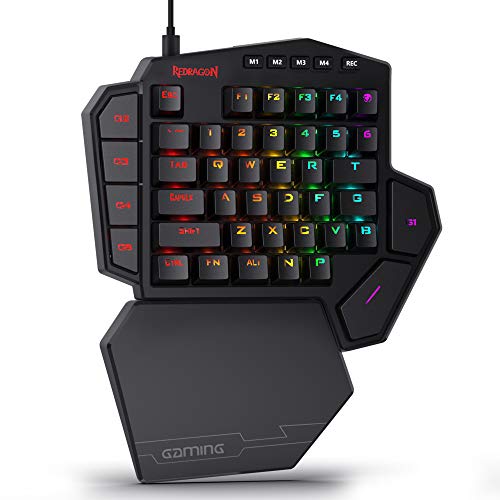
The K585 DITI is the budget pick and the closest thing here to a small keyboard. It keeps 42 keys, more than any other entry, arranged as a compact left-hand cluster with seven dedicated macro keys. The switches are Redragon mechanicals in Brown, Red or Blue, and the hot-swappable sockets let you pull and replace switches without soldering, which no other keypad in this group offers.
A detachable wrist rest connects magnetically, a USB pass-through port sits on the board for a dongle or headset receiver, and the detachable USB-C cable keeps the connection tidy. RGB backlighting runs in five modes, and Redragon’s software handles remapping and the macro sets, 28 across the four onboard profiles. The compromises: it takes the most desk space here, there is no thumbpad or stick, so movement stays on WASD, and the hard wrist rest will not suit everyone.
Specs
- Switch type: Redragon mechanical (Brown, Red or Blue), hot-swappable
- Keys: 42, including 7 dedicated macro keys
- Profiles: 4 onboard, set in Redragon software
- Wrist rest: detachable, magnetic
- Connection: wired USB-C, detachable cable, USB pass-through
- Backlighting: RGB, 5 modes
- Dimensions: 11 x 9 x 2 inches
- Weight: 1.3 pounds
- Model number: K585 WIRED
- Price tier: budget
How to Choose a Gaming Keypad
Start with the thumb control, because it decides how movement feels. An 8-way thumbpad, as on both Razer models, is really eight extra buttons in a cross: good for weapon swaps, limited for steering movement. A true analog stick, as on the Azeron and HORI, gives graded movement. The Redragon has neither, which is fine if your fingers already own WASD.
Next, match the switch to your games. Analog optical keys earn their keep in titles that read controller input, where a half press can walk and a full press can run, and rapid trigger helps in fast shooters. Mechanical switches give the clearest feedback and, on the K585, can be swapped. Mecha-membrane sits between the two.
Then count what you will actually bind. MMO rotations can fill 30 or more keys plus a macro layer, which favors the Razer pair and the K585. Shooter players need far fewer and benefit more from thumb control and actuation speed. Finally, check the platform: the HORI is the only pick built for PlayStation.
Who Should Skip a Gaming Keypad
Skip a keypad if you play mostly on a full keyboard already; a keypad duplicates keys you own and adds a second device to your desk. Skip it if you need to type at the same station, because none of these has a full alphanumeric layout.
Also skip it if your games are console titles without keyboard and mouse support, since even the licensed HORI only works in games that enable that mode. Players with smaller hands should be cautious with the Azeron, and anyone who wants a wireless desk should look elsewhere: all five here are wired.
FAQ
Do gaming keypads work with any PC game?
Almost all of them. A keypad presents itself to the PC as a keyboard, so any game that accepts keyboard input accepts its keys and macros. The exception is analog input: graded presses and stick movement only register as analog in games that also accept controller input; elsewhere they behave as ordinary key presses.
Is a gaming keypad better than a keyboard for FPS games?
It is better in two narrow ways: it frees desk space so the mouse can sweep wider, and on analog models it adds thumbstick movement or rapid trigger keys. It does not add keys a shooter needs beyond what a keyboard has, and movement stays digital unless the game reads analog input.
Can I use a gaming keypad on PlayStation 5?
Only in games that support keyboard and mouse input, and the HORI Tactical Assault Commander is the pick built for it, with official Sony licensing, console profiles and a port for your mouse. PC keypads such as the Razer and Redragon models are not designed or licensed for console use.
How many programmable keys do I actually need?
Count your binds in your most demanding game, then add a small margin. Shooter players often use 12 to 20. MMO players with long rotations, pet commands and consumables can fill all 32 keys on a Tartarus plus its second layer. A mid-size layout with good software matters more than the highest key count.
Conclusion
For most one-handed players, the Razer Tartarus Pro is the keypad to buy first: analog optical keys with adjustable actuation and dual-function presses give it a ceiling the others do not reach. The Azeron Cyborg II is better when movement is the priority, thanks to its drift-free analog stick. The Tartarus V2 covers the same layout for less, the HORI TAC is the console answer, and the Redragon K585 DITI delivers hot-swappable keys at a budget tier.
Product and ASIN Reference
| Product | ASIN |
|---|---|
| Razer Tartarus Pro Gaming Keypad | B07YQKS4B5 |
| Azeron Cyborg II Gaming Keypad (Black) | B0DFMP5HP3 |
| Razer Tartarus V2 Gaming Keypad | B07754PYFK |
| HORI Tactical Assault Commander Mechanical Keypad (SPF-030U) | B0BJWGSY42 |
| Redragon K585 DITI One-Handed Gaming Keyboard | B07NBJVH4G |