Our Short List of 3
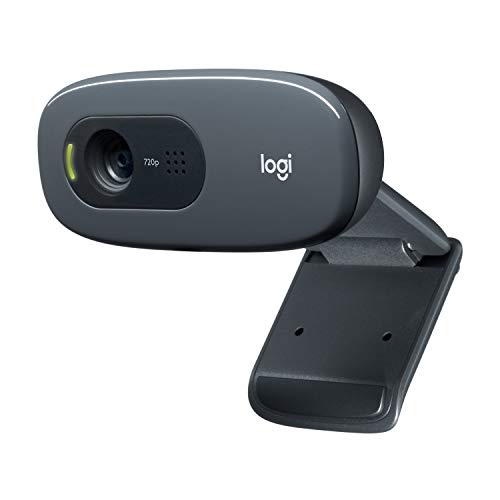
- Best for: Remote workers who want a dependable camera for daily meetings.
- 720p widescreen HD video calling
- Light correction
- Noise-reducing microphone
- 60-degree field of view
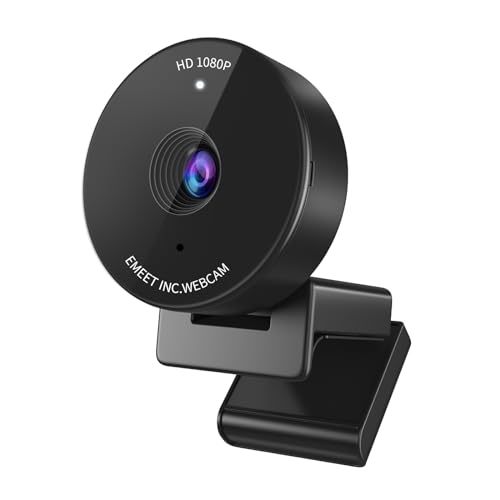
- Best for: Solo video calls where privacy and a sharper image matter.
- 1080p video at 30 frames per second
- Physical privacy cover
- Auto light correction
- Fixed focus
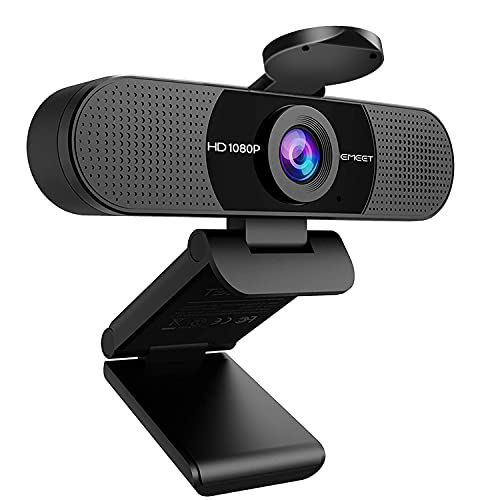
- Best for: Shared desks, tutoring and calls with two people in frame.
- 1080p video
- 2 built-in microphones
- 90-degree field of view
- USB plug and play
All 4 Picks at a Glance
| Product | Specs | Action |
|---|---|---|
| Logitech C270 HD Webcam |
| Check price on Amazon |
| EMEET C950 1080P Webcam |
| Check price on Amazon |
| EMEET C960 1080P Webcam |
| Check price on Amazon |
 NexiGo N660P (Gen 2) |
| Check price on Amazon |
Key takeaways
- Compare 4 budget webcams for clear video calls, from a simple 720p Logitech to 1080p models with privacy covers and autofocus.
A budget webcam is not about chasing the sharpest image on the market; it is about being clearly seen and heard on every call without fiddling with settings each time. The real choice is between a simple plug-and-play camera that just works, a wider-angle model that fits two people in frame, and a smoother 60 frames-per-second model for streaming or recording, and each of those needs a different webcam.
This guide is for remote workers joining daily video meetings, for students attending online classes, and for anyone setting up a home desk who needs a reliable camera without spending on a premium model. Every webcam below is chosen from the details on its Amazon product page, including resolution, frame rate, field of view, microphone setup and privacy features.
Quick Picks
As an Amazon Associate we earn from qualifying purchases.
| Product | Best for | Key spec from title |
|---|---|---|
| Logitech C270 HD Webcam | Simple, reliable everyday video calls | 720p widescreen HD video calling |
| EMEET C950 1080P Webcam | Private, solo calls with a covered lens | 1080p with physical privacy cover |
| EMEET C960 1080P Webcam | Calls with two people in frame | 1080p with 90-degree field of view |
| NexiGo N660P (Gen 2) | Smooth video for streaming and recording | 1080p at 60 frames per second |
How to Choose
Pick the resolution your calls actually need
Resolution is the first decision, and more is not always better for a budget webcam. A 720p camera is enough for standard video meetings, where the other side sees you in a small window and bandwidth matters more than fine detail. A 1080p camera gives a sharper image for larger screens, recorded lessons and streams, and it holds up better when you share your face alongside a presentation. Check the resolution and frame rate on the Amazon listing rather than the marketing headline, and remember that a 1080p sensor recording at 30 frames per second looks different from one running at 60 frames per second.
Check the field of view before you buy
Field of view decides how much of your room the camera shows, and the wrong angle is a common budget-webcam regret. A narrow view of around 60 degrees frames one person tightly and keeps the background out of shot, which suits a tidy desk in a small room. A wide view of around 90 degrees or more fits two people side by side or shows a whiteboard behind you, but it also shows more of the room. The Amazon listing states the field of view for most models, so compare it against how you sit: one person close to the screen needs a narrow lens, while a shared desk needs a wide one.
Do not overlook the microphone
Most budget webcams include a built-in microphone, and its quality decides whether your colleagues hear you clearly or ask you to repeat yourself. A single microphone is fine for quiet rooms, while dual microphones with noise reduction handle keyboard clicks and household sounds better. The listing usually states the microphone count and whether noise reduction is included, so read that line before deciding. If your room is noisy or you take calls all day, a webcam with two microphones is worth the step up, and a headset remains the fallback for the noisiest days.
Look for a privacy cover and easy setup
A physical privacy cover is a small feature that matters every day, because it lets you block the lens with a slide instead of unplugging the camera or taping over it. Fixed-focus cameras keep things simple and suit a desk where you sit at the same distance each day, while autofocus models stay sharp if you lean in and out. Setup should be plug and play over USB with no driver download, and the listing should name the systems it works with, such as Windows, macOS and Chrome OS, plus the apps you use for calls.
The 4 Best Options
Logitech C270 HD Webcam
- Best for: Remote workers who want a dependable camera for daily meetings.
- 720p widescreen HD video calling
- Light correction
- Noise-reducing microphone
- 60-degree field of view
Remote workers who want a dependable camera for daily meetings.
It records at 720p, so the image is softer than the 1080p models here on large screens or recorded video.
The C270 is the straightforward choice for everyday video calls: a 720p widescreen camera with light correction and a noise-reducing microphone, built by a brand whose webcams have been a desk staple for years. It plugs in over USB and works with common calling apps, and its 60-degree field of view frames one person neatly without showing much of the room behind. For a home worker who joins meetings all day and wants a camera that simply works, this is the lowest-fuss pick in this guide.
Watch out for: It records at 720p, so the image is softer than the 1080p models here on large screens or recorded video.
EMEET C950 1080P Webcam
- Best for: Solo video calls where privacy and a sharper image matter.
- 1080p video at 30 frames per second
- Physical privacy cover
- Auto light correction
- Fixed focus
Solo video calls where privacy and a sharper image matter.
Fixed focus suits a fixed seating distance; if you move around a lot on camera, an autofocus model stays sharper.
The EMEET C950 steps up to 1080p video at 30 frames per second with a physical privacy cover, auto light correction and a fixed-focus lens, which makes it a strong pick for solo calls from a desk. Its 70-degree field of view frames one person comfortably, and the single omnidirectional microphone picks up your voice without a separate mic on the desk. The privacy cover is the detail that sets it apart at this level: slide it shut between calls and the lens is covered without unplugging anything.
Watch out for: Fixed focus suits a fixed seating distance; if you move around a lot on camera, an autofocus model stays sharper.
EMEET C960 1080P Webcam
- Best for: Shared desks, tutoring and calls with two people in frame.
- 1080p video
- 2 built-in microphones
- 90-degree field of view
- USB plug and play
Shared desks, tutoring and calls with two people in frame.
The wide angle shows more of the room behind you, so check what sits in frame before your first call.
The EMEET C960 is the pick when two people share the frame, thanks to a 90-degree field of view that fits a pair at a desk without squeezing anyone to the edge. It records in 1080p, has two built-in microphones for clearer voice pickup, and plugs in over USB with no setup beyond connecting it. That combination suits couples sharing a home office, small study groups and tutoring sessions where one camera has to cover more than one face.
Watch out for: The wide angle shows more of the room behind you, so check what sits in frame before your first call.
NexiGo N660P (Gen 2)
- Best for: Streaming, recording lessons and video calls where smooth motion matters.
- 1080p at 60 frames per second
- Autofocus
- Dual microphone
- Privacy cover included
Streaming, recording lessons and video calls where smooth motion matters.
Software control and higher frame rates use more of your computer’s resources, so check your system handles 1080p at 60 frames per second before relying on it.
The NexiGo N660P (Gen 2) is the smoothest camera here, recording 1080p at 60 frames per second with autofocus, dual microphones and software control for fine-tuning the image. That frame rate makes movement look natural on streams and recordings, and autofocus keeps you sharp when you lean toward the screen or sit back. It is the pick for anyone who records lessons, streams casually or simply wants the most polished image a budget webcam can give.
Watch out for: Software control and higher frame rates use more of your computer’s resources, so check your system handles 1080p at 60 frames per second before relying on it.
Which One Fits Your Situation
You join video meetings all day from a home desk
Pick the Logitech C270 HD Webcam. It is simple, reliable and proven for daily calls, with light correction and a noise-reducing mic that handle ordinary rooms well. The narrow field of view keeps the focus on you, and there is nothing to configure before each meeting. Clip it on top of the monitor, plug in the USB cable, and you are ready for the first call of the day.
You want a sharper image and a covered lens between calls
Pick the EMEET C950 1080P Webcam. The step up to 1080p is visible on larger screens, the privacy cover closes the lens in one slide, and auto light correction helps in rooms where the light changes through the day. It is the best balance of image quality and privacy here.
Two of you share one desk and one camera
Pick the EMEET C960 1080P Webcam. Its 90-degree field of view fits two people without crowding, and the dual microphones pick up both voices better than a single mic. It suits couples working from home, study partners and tutors who teach from a shared desk. Sit side by side at a normal distance from the screen and both faces stay in frame without anyone leaning in.
You record video or stream and want the smoothest picture
Pick the NexiGo N660P (Gen 2). The 1080p at 60 frames per second makes motion look fluid, autofocus keeps you sharp as you move, and software control lets you tune the picture. It is the most capable camera in this guide for anyone whose video is recorded or watched by an audience.
Common Mistakes
- Buying the highest resolution on the box without checking the frame rate, then getting a choppy image on calls.
- Choosing a wide-angle webcam for a solo desk and showing the whole room behind you on every meeting.
- Ignoring the microphone and discovering too late that colleagues cannot hear you over keyboard and room noise.
- Picking a webcam without a privacy cover and taping over the lens or unplugging it between calls.
- Forgetting to check that the webcam works with your operating system and calling app before ordering.
Frequently Asked Questions
Is 720p enough for video calls?
Yes, for most meetings it is. A 720p camera looks clear in the small video window used by calling apps, and it uses less bandwidth than 1080p, which helps on slower connections. Step up to 1080p if you present on large screens, record lessons or stream, where the extra sharpness is visible.
Do budget webcams need software to work?
Most budget webcams are plug and play over USB and work with common calling apps without extra software. Some models offer optional software for adjusting brightness, zoom or focus, but the camera itself should work as soon as it is connected. Check the listing for the systems it supports, such as Windows, macOS and Chrome OS.
What field of view should I choose for one person?
A field of view around 60 to 70 degrees frames one person well and keeps most of the background out of shot. Wider angles of 90 degrees or more suit two people or a whiteboard behind you, but they show more of the room. Match the angle to how you sit and how much background you are happy to share.
Why does my webcam look dark on calls?
Low light is the usual cause, and a webcam with auto light correction helps by brightening the image. Sit facing a window or a lamp rather than with a bright window behind you, and keep the light in front of your face. A privacy cover left half-closed can also darken the image, so check that it is fully open before a call.