Key takeaways
- Five pen-ready Windows tablets for remote work compared: Surface Pro 11, Surface Pro 12, and Surface Pro 9 with pen support, specs, and buying guidance.
A remote worker choosing a pen-enabled Windows tablet is really deciding how much of the working day happens on a screen that can be written on. Video calls, handwritten notes, document markup, signatures, and quick diagrams all move faster when a pen is always in hand, and because these tablets run full Windows, the same desktop apps from the office PC run on the tablet too.
This roundup is for remote workers who annotate documents between calls, consultants who sign off on the move, researchers who handwrite notes, and anyone who wants one device for meetings and paperwork. The five tablets below were chosen from names and specifications on their Amazon pages, with pen support and Windows confirmed from each listing.
Quick Picks
As an Amazon Associate we earn from qualifying purchases
| Product | Best for | Key spec from title |
|---|---|---|
| Microsoft Surface Pro 11 Bundle | Remote workers who want pen and keyboard in one box | 13-inch 2.8K touchscreen with Slim Pen |
| Microsoft Surface Pro 11 OLED Bundle | Long sessions where screen quality matters most | 13-inch OLED touchscreen, Snapdragon X Elite |
| Microsoft Surface Pro 12 Tablet | Travel days when every gram counts | 12-inch touchscreen, Snapdragon X Plus |
| Microsoft Surface Pro 12 Bundle | Starting remote work with everything included | 12-inch touchscreen with keyboard and stylus |
| Microsoft Surface Pro 9 | Intel-based work on a proven design | 13-inch PixelSense touchscreen, Intel Evo i5 |
How to Choose
Pen support and inking feel
Start with what is actually in the box. Some bundles ship with the Slim Pen included, while other listings sell the tablet alone and the pen is a separate purchase, so check the included-components field before ordering. Look for a pen that charges and stores on the tablet or in the keyboard, because a pen that lives in a drawer gets forgotten. Palm rejection matters for long note sessions, and a pen with a flat edge or a loop stays with the device on the move. If handwriting is the main job, a tablet with a higher refresh rate keeps the ink closer to the tip.
Screen size, weight, and battery life
The 12-inch models suit bags and tray tables, while the 13-inch models give documents and split-screen work more room. Weight matters more than it looks on a spec sheet: the lightest tablet here is 1.16 kilograms, and carrying it through airports all week makes the difference obvious. Battery life decides how often the charger comes out, with the tablets here rated for up to 15.5 or 16 hours of use. A built-in kickstand props the screen up for calls without a separate stand, which keeps a small desk tidy.
Processor, memory, and storage for real work
Two processor families appear in this roundup, and the choice shapes which apps run best. The Snapdragon X Plus and X Elite chips power Copilot+ PC features and sip battery, while the Intel Evo i5 in the Surface Pro 9 runs the full range of traditional Windows software without compatibility questions. Memory matters for multitasking: 16GB handles calls, documents, and a browser full of tabs at once, while 8GB suits lighter days. Storage runs from 256GB to 1TB, so pick room for offline files and large documents.
Keyboard, ports, and video calls
A detachable keyboard turns a tablet into a laptop, so note whether it is bundled or sold separately, and whether it stores and charges the pen. Two USB-C ports cover charging and a monitor or hub, and Wi-Fi 6 keeps video calls steady on a home network. Front camera quality decides how a remote worker looks on calls: the Surface Pro 11 lists a full HD 1080p front camera with AI-powered framing, while the Surface Pro 12 lists a 2.07-megapixel front camera with a 10-megapixel rear camera that records 4K video. Check the microphone and speaker setup too, since calls are the daily routine.
The 5 Best Options
Microsoft Surface Pro 11 Bundle

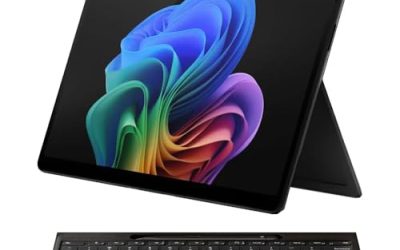
The Surface Pro 11 bundle is the most complete starting point in this roundup, because the box holds the tablet, the Pro Keyboard, and the Slim Pen. The 13-inch PixelSense touchscreen runs at 2880 by 1920 with a refresh rate up to 120Hz, and the Snapdragon X Plus chip with 10 cores keeps calls, documents, and browser tabs moving together. With 16GB of memory and 512GB of storage, plus Windows 11 Pro, it covers a full remote workday without reaching for another machine. The kickstand and detachable keyboard turn it from tablet to laptop in seconds.
Specs
- 13-inch PixelSense LCD touchscreen, 2880 x 1920, refresh rate up to 120Hz
- Qualcomm Snapdragon X Plus, 10 cores, up to 3.4 GHz
- 16GB RAM, 512GB SSD
- Windows 11 Professional
- Touchscreen with stylus support; Slim Pen and Pro Keyboard included
- 2 x USB-C ports; Wi-Fi 6; Bluetooth
- 1.97 lbs; 11.3 x 8.2 x 0.37 inches
- FHD 1080p front-facing camera with AI-powered automatic framing
Best for: Remote workers who want the pen, keyboard, and tablet in one box.
Watch out for: The listing describes the bundle as professionally upgraded and customized, with the manufacturer box opened for customizing and testing, so check the seller details before ordering.
Microsoft Surface Pro 11 OLED Bundle
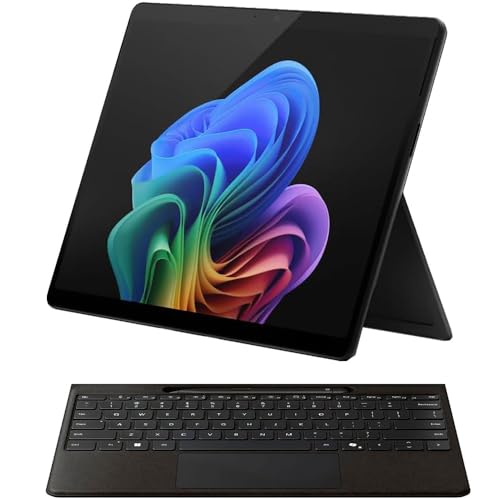
The OLED bundle is the Surface Pro 11 for people who stare at a screen all day. The 13-inch OLED touchscreen gives text and video a deeper, sharper look than the LCD models, and the Snapdragon X Elite chip with 12 cores sits above the X Plus in the same family. It carries 16GB of memory and 1TB of storage, so large files and offline folders fit easily, and the included Surface Pro Keyboard turns the tablet into a laptop when typing takes over. Windows 11 with Copilot support rounds out a machine built for long, screen-heavy workdays.
Specs
- 13-inch OLED touchscreen display
- Qualcomm Snapdragon X Elite, 12 cores
- 16GB RAM, 1TB storage
- Windows 11 Copilot+ PC
- Surface Pro Keyboard included; works with Surface Slim Pen
- Touchscreen with stylus support
Best for: Remote workers who spend long days reading and marking up documents.
Watch out for: The Amazon listing names the keyboard in the bundle, so confirm whether a pen is included before ordering, since the pen may be a separate purchase.
Microsoft Surface Pro 12 Tablet

The Surface Pro 12 is the lightest tablet here, and the one to pick when the bag matters as much as the screen. Its 12-inch PixelSense touchscreen runs at 2196 by 1464 with a 90Hz refresh rate, and the Snapdragon X Plus chip with 8 cores keeps everyday work moving while the battery lasts up to 16 hours. With 16GB of memory and 512GB of storage, it handles calls, notes, and documents without strain. The 165-degree kickstand props it up anywhere, and the Slim Pen works with it for handwriting.
Specs
- 12-inch PixelSense touchscreen, 2196 x 1464, 90Hz, 400 nits
- Qualcomm Snapdragon X Plus, 8 cores, up to 3.4 GHz
- 16GB LPDDR5 RAM, 512GB storage
- Windows 11 Home
- Touchscreen with stylus support; compatible with Surface Pro Keyboard and Slim Pen
- Up to 16 hours of battery life; 37.45 Wh battery
- 2 x USB-C 3.2 ports; Wi-Fi 6; Bluetooth
- 1.16 kg; 10MP rear camera with 4K video recording
Best for: Remote workers who travel light and work from anywhere.
Watch out for: The keyboard and pen are sold separately, and no charger is included in the box, so budget for both if the tablet is the only machine.
Microsoft Surface Pro 12 Bundle

The Surface Pro 12 bundle is the ready-to-work version of the same tablet, with the extras already in the box. It pairs the 12-inch PixelSense touchscreen with a compatible backlit keyboard, a stylus pen, and a 12-month Microsoft 365 Personal subscription card, so a new remote worker can start without hunting for accessories. The Snapdragon X Plus chip and 16GB of memory cover calls, documents, and browser work, while 512GB of storage holds offline files. A 65W dual USB-C and USB-A fast charger is included too.
Specs
- 12-inch PixelSense touchscreen, 2196 x 1464, 400 nits
- Qualcomm Snapdragon X Plus
- 16GB RAM, 512GB storage
- Windows 11
- Compatible backlit keyboard, stylus pen, and Microsoft 365 Personal 12-month subscription card included
- 65W dual USB-C and USB-A fast charger included
- 2-in-1 tablet laptop with webcam
Best for: New remote workers who want keyboard, pen, and software in one purchase.
Watch out for: The keyboard and stylus in this bundle are compatible accessories rather than Microsoft-branded parts, so check the listing details before ordering.
Microsoft Surface Pro 9

The Surface Pro 9 is the Intel-based option in this roundup, and the right pick for remote workers whose software runs best on an Intel chip. Its 13-inch PixelSense touchscreen runs at 2880 by 1920, and the 12th Gen Intel Evo i5 processor with 8GB of memory and 256GB of storage handles calls, documents, and everyday apps with ease. The battery lasts up to 15.5 hours, the tablet weighs 1.9 pounds, and the screen is built for touch and pen. It is the most proven design here, still selling on Amazon years after launch.
Specs
- 13-inch PixelSense touchscreen, 2880 x 1920
- Intel Evo i5, 12th Gen, up to 4.4 GHz
- 8GB RAM, 256GB storage
- Windows 11 Home
- Touchscreen built for touch and pen
- Up to 15.5 hours of battery life; 46.52 Wh battery
- 10MP rear camera; 2 x 2W speakers
- 1.9 lbs; Wi-Fi 6; Bluetooth; USB Type-C
Best for: Remote workers who need an Intel chip for their Windows software.
Watch out for: The Surface Slim Pen 2 and keyboard are sold separately, and 8GB of memory suits lighter multitasking days rather than heavy ones.
Which One Fits Your Situation
You want the pen and keyboard ready on day one
Pick the Surface Pro 11 bundle, which ships with the Slim Pen and Pro Keyboard in the box, or the Surface Pro 12 bundle, which adds a keyboard, stylus, and Microsoft 365 card. Both remove the extra shopping trip and work straight out of the box.
You travel light and work from anywhere
Pick the Surface Pro 12 tablet, the lightest machine here at 1.16 kilograms, with up to 16 hours of battery life and a kickstand that props the screen up on any desk. Add a Slim Pen and a compact keyboard when the bag allows.
You spend all day reading and marking up documents
Pick the Surface Pro 11 OLED bundle, whose 13-inch OLED touchscreen makes text sharper and easier on the eyes across long sessions. The 1TB of storage holds large document libraries offline, and the included keyboard handles all the typing between markups.
You run Windows software that needs an Intel chip
Pick the Surface Pro 9, the only Intel machine in this roundup, with a 12th Gen Intel Evo i5 processor that runs traditional Windows software without compatibility questions. Its 13-inch screen and 15.5-hour battery cover a full remote workday, and the pen-ready screen suits notes between calls.
Common Mistakes
- Buying a tablet alone and discovering the pen and keyboard are separate purchases.
- Picking a Snapdragon tablet without checking that every work app runs on ARM.
- Choosing the smallest storage and running out of room for offline files.
- Ignoring battery life and carrying a charger everywhere.
- Ordering a seller-upgraded bundle without reading what was opened or changed.
Frequently Asked Questions
Do all five tablets include a pen in the box?
No. The Surface Pro 11 bundle includes the Slim Pen, and the Surface Pro 12 bundle includes a stylus, but the Surface Pro 12 tablet and the Surface Pro 9 sell the pen separately. Check the included-components field on the Amazon listing before ordering, and confirm whether the pen charges on the tablet or in the keyboard.
Can these tablets replace a laptop for remote work?
Yes, with a keyboard attached. Each tablet runs full Windows and the same desktop apps as a laptop, and the kickstand plus a detachable keyboard turns it into a small laptop. For heavy typing days, a proper keyboard matters more than the tablet itself, so budget for one if it is not bundled.
How much memory and storage does a remote worker need?
16GB of memory suits calls, documents, and a browser full of tabs at once, while 8GB covers lighter days with fewer apps open. Storage from 512GB holds offline files and large documents comfortably, while 256GB fills up faster when work files pile up. Pick the larger option when the tablet is the only machine.
Do Snapdragon tablets run all Windows apps?
Most modern apps run well on Snapdragon X chips, including browsers, Office, and video calling apps, and Copilot+ PC features are built in. A small number of older or specialist programs may need an emulator or may not run at all, so check the apps the job depends on before choosing a Snapdragon tablet over the Intel-based Surface Pro 9.