Key takeaways
- Compare three Windows detachable tablets built for mobile presentations, with bright touchscreens, detachable keyboards, long battery life and Windows apps.
A mobile presentation puts a tablet in an awkward middle ground. The device has to run the same slide deck, spreadsheet, and video call software as a laptop, yet it also has to come out of a bag, stand on a narrow lectern, and pass around a room without cables. A detachable Windows tablet solves that tension because the keyboard lifts away in seconds, leaving a slim touchscreen slate, and then clicks back into place when notes or edits need a proper keyboard.
The three picks below cover different kinds of presenters. A consultant who moves between client offices needs a bright, high-resolution screen and a keyboard included in the box. A trainer who works mainly from familiar venues can save weight with a compact twelve-inch model. A presenter who relies on Intel software and Windows 11 Pro will find a thirteen-inch option in the middle. Each runs full Windows, supports touch and pen input, and pairs with a detachable keyboard for the switch between presenting and typing.
Quick Picks
As an Amazon Associate we earn from qualifying purchases
| Product | Best for | Key spec from title |
|---|---|---|
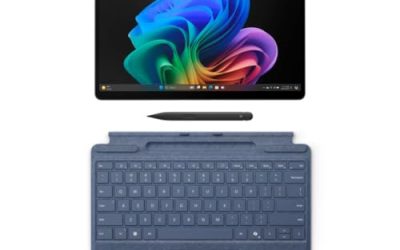
| Microsoft Surface Pro 11 Snapdragon X Elite Laptop/Tablet, 13-inch OLED Touchscreen, 16GB RAM, 1TB Storage, Bundle with Surface Pro Keyboard | Presenters who want the brightest screen and a keyboard included | 13-inch OLED touchscreen, Snapdragon X Elite, 16GB RAM, 1TB storage |
| Microsoft Surface Pro 9, 13-inch Touchscreen, Intel Core i5, 16GB Memory, 256GB SSD, Windows 11 Pro, Platinum | Presenters who need Windows 11 Pro and Intel compatibility | 13-inch touchscreen, Intel Core i5, 16GB memory, 256GB SSD |
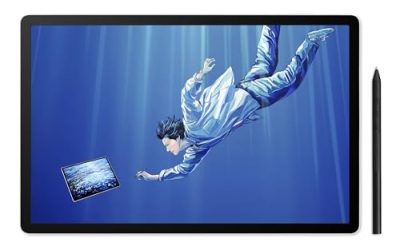
| Microsoft Surface Pro 2-in-1 Laptop/Tablet (2025), 12-inch Touchscreen, Snapdragon X Plus, 16GB RAM, 512GB Storage, Platinum | Travellers who want the lightest bag and a smaller footprint | 12-inch touchscreen, Snapdragon X Plus, 16GB RAM, 512GB storage |
How to Choose
Screen size and brightness for a room
A thirteen-inch screen gives slides, speaker notes, and a video call window enough room to sit side by side without constant switching, while a twelve-inch screen feels noticeably lighter in a shoulder bag and on a small side table. Resolution matters more than size alone, because dense text, charts, and small labels stay legible when the panel is sharp. Look for a touchscreen with a wide viewing angle, so people seated to the side of a meeting table can still follow a chart. A matte or low-glare finish helps under ceiling lights, and a built-in kickstand lets the tablet stand at a comfortable angle without a separate prop.
Detachable keyboard and typing comfort
The keyboard is where detachable tablets differ most from ordinary slates. A magnetic keyboard that clicks firmly into place, provides full-size keys, and includes a trackpad turns a tablet into a workable laptop between sessions. Check whether the keyboard is included with the tablet or sold separately, because that changes what arrives in the box and what still needs to be packed. Backlit keys help in dim conference rooms, and a keyboard that folds flat behind the tablet protects the screen during a walk between rooms. A pen adds value for annotating slides, although it is often a separate purchase.
Processor, memory, and storage for live work
Presentations rarely demand a powerful graphics chip, yet they do punish a weak processor when a slide deck, a browser with several tabs, and a video call run at the same time. Sixteen gigabytes of memory keeps that combination smooth, and it leaves room for a large deck with embedded video. Storage of 256GB covers documents and a modest media library, while 512GB or 1TB suits presenters who carry many videos, high-resolution images, and offline files. Choose a processor family that matches the software already in use, especially when older Windows applications, drivers, or peripherals are part of the daily routine.
Ports, wireless, and battery life on the move
A presenter needs a reliable way to reach a projector, a large display, or a conference room hub, so USB-C ports with video output are essential. Thunderbolt support adds flexibility for docks and high-resolution external screens, while Wi-Fi 6 keeps large file downloads and cloud sync moving in busy venues. Battery life decides whether a charger has to travel too, so a tablet that lasts through several meetings without a top-up removes one worry from the day. A front camera with clear video and a microphone that picks up speech from a normal distance also matters, because many presentations now include remote participants.
The 3 Best Options
Microsoft Surface Pro 11 Snapdragon X Elite Laptop/Tablet, 13-inch OLED Touchscreen, 16GB RAM, 1TB Storage, Bundle with Surface Pro Keyboard
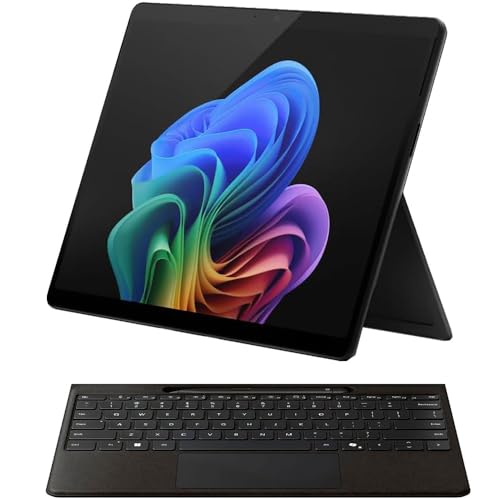
This bundle is the most complete presentation package in this guide, because the tablet, the Surface Pro Keyboard, and the power supply arrive together and work as one system from the first meeting. The thirteen-inch OLED touchscreen renders slides with deep contrast and vivid colour, which helps charts, photographs, and video stand out in a bright room. Snapdragon X Elite processing, sixteen gigabytes of memory, and one terabyte of storage handle a large deck, a browser, and a video call without forcing the presenter to close applications between segments.
Specs
- 13-inch OLED touchscreen display with 2880 x 1920 resolution
- Qualcomm Snapdragon X Elite processor
- 16GB RAM and 1TB SSD storage
- Windows 11 Copilot+ PC
- Surface Pro Keyboard included in the bundle
- Two USB-C ports with USB 4.0 and Thunderbolt 4 support
- Up to 14 hours of battery life
Best for: Consultants and client-facing presenters who want a bright OLED screen, a keyboard in the box, and generous storage for media-rich decks.
Watch out for: The OLED configuration and the bundled keyboard make this the largest and most fully equipped pick here, so confirm that the tablet plus keyboard fits the bag and the lectern space used most often.
Microsoft Surface Pro 9, 13-inch Touchscreen, Intel Core i5, 16GB Memory, 256GB SSD, Windows 11 Pro, Platinum

The Surface Pro 9 suits presenters who want a familiar Intel platform and Windows 11 Pro, especially when existing software, security policies, or peripherals were chosen around Intel hardware. Its thirteen-inch touchscreen uses the same 2880 x 1920 resolution as the newer flagship, so text and diagrams remain crisp for an audience seated a few metres away. Sixteen gigabytes of memory and a 256GB solid-state drive cover slide decks, documents, and everyday multitasking, while the detachable keyboard design lets the device shift from laptop mode at a desk to tablet mode at a whiteboard.
Specs
- 13-inch touchscreen display with 2880 x 1920 resolution
- Intel 12th Gen Core i5 processor with Intel Iris Xe Graphics
- 16GB memory and 256GB SSD storage
- Windows 11 Pro operating system
- 5MP front-facing camera and 8MP rear-facing camera with 1080p HD video recording
- Thunderbolt 4 and USB-C ports
- Detachable Type Cover keyboard compatibility
Best for: Business presenters and trainers who need Windows 11 Pro, Intel compatibility, and a proven thirteen-inch detachable design.
Watch out for: Storage is limited to 256GB in this configuration, so presenters who carry large video files should plan for cloud storage or an external drive, and the keyboard may need to be bought separately depending on the listing configuration.
Microsoft Surface Pro 2-in-1 Laptop/Tablet (2025), 12-inch Touchscreen, Snapdragon X Plus, 16GB RAM, 512GB Storage, Platinum

The twelve-inch Surface Pro from 2025 is the travel-first pick, because its smaller screen and lighter frame take up less room on a crowded table and in a carry-on bag. Snapdragon X Plus processing with eight cores, sixteen gigabytes of memory, and 512GB of storage still cover the core presentation workload: a slide deck, a browser, notes, and a video call running together. The 2196 x 1464 touchscreen keeps text legible at this size, and the detachable keyboard turns the slate into a compact laptop for editing a deck on a train, in a lounge, or between back-to-back meetings.
Specs
- 12-inch touchscreen display with 2196 x 1464 resolution
- Qualcomm Snapdragon X Plus processor with 8 cores
- 16GB RAM and 512GB storage
- Windows 11 Copilot+ PC
- Model EP2-33671 in Platinum
- Detachable Surface Pro Keyboard support
- USB-C connectivity for displays and charging
Best for: Frequent travellers and speakers who want the smallest, lightest detachable tablet in this guide without giving up sixteen gigabytes of memory.
Watch out for: The keyboard is sold separately for this device-only configuration, so add a compatible Surface Pro Keyboard before the first trip, and check that older Windows software runs on the Snapdragon platform before relying on it for a live session.
Which One Fits Your Situation
You present to clients in different offices every week
Choose the Surface Pro 11 bundle, because the OLED screen holds up under varied lighting and the keyboard is already included, so nothing essential is left behind. The large storage capacity suits media-rich decks, and the two Thunderbolt 4 ports connect quickly to unfamiliar docks and displays. Its thirteen-inch screen also gives speaker notes and a video call enough space to share the display without shrinking the slides.
You travel light and present from small rooms
Choose the twelve-inch Surface Pro from 2025, because the smaller footprint fits narrow lecterns, cafe tables, and crowded meeting rooms. Sixteen gigabytes of memory and 512GB of storage still handle a full presentation workload, and the lighter frame is easier to carry between venues. Remember to pack the detachable keyboard separately, since this configuration ships as a device-only tablet.
You need Windows 11 Pro and Intel software compatibility
Choose the Surface Pro 9, because Windows 11 Pro and the Intel Core i5 platform match many business environments, security setups, and older applications. The thirteen-inch high-resolution touchscreen works well for both presenting and annotating, and the detachable design keeps the device flexible. Plan storage carefully, since this configuration holds 256GB and large video libraries may need external or cloud storage.
You switch between presenting, annotating, and typing all day
Choose the Surface Pro 11 bundle or the Surface Pro 9, depending on whether an OLED screen and a bundled keyboard matter more than Intel compatibility. Both thirteen-inch models give slides and notes room to breathe, and both accept a pen for marking up diagrams during a discussion. Keep the keyboard attached for typing sessions, then detach it and use the kickstand when the focus shifts to the audience.
Common Mistakes
- Buying a tablet without checking whether the detachable keyboard is included, then discovering on the first trip that typing and editing are awkward without it.
- Choosing a screen that is too small for the room, so charts, labels, and speaker notes become hard to read from the back of the table.
- Filling a 256GB drive with video and large decks, then running short of space during a week of travel with no time to clear files.
- Assuming every USB-C port supports video output, and arriving at a venue to find that the only available adapter does not connect to the projector.
- Forgetting to confirm that older Windows software runs on a Snapdragon processor before using it for a live presentation with no backup device.
Frequently Asked Questions
Can a detachable Windows tablet replace a laptop for presentations?
Yes, for most presenters it can, because it runs full Windows, opens the same slide and document software, and connects to displays through USB-C. The detachable keyboard restores laptop-style typing between sessions, while tablet mode suits walking around a room, annotating slides, and handing the device to a colleague. A separate laptop still makes sense when heavy video editing or specialised desktop software is part of the daily workload.
Do I need a keyboard with a detachable tablet for mobile presentations?
A keyboard is not needed while the slides are running, yet it becomes important for last-minute edits, speaker notes, and email between sessions. A detachable keyboard that clicks on magnetically gives both modes without carrying a second device. Check the listing carefully, because some configurations include the keyboard and others ship as a device-only tablet that needs a compatible keyboard added separately.
Is a twelve-inch screen large enough for presenting to a group?
A twelve-inch screen is large enough for the presenter, because the audience watches a projector or a large display rather than the tablet itself. The tablet acts as a controller, a notes screen, and an annotation surface, so its size matters mainly for legibility at arm’s length. A thirteen-inch screen gives more room for notes beside the slides, which helps when the presenter works without a second display.
What should I check before using a new tablet for a live presentation?
Check the display connection, the keyboard attachment, the pen battery if one is used, and the software compatibility of the slide deck. Open the deck on the tablet, play any embedded video, and connect to the venue display before the audience arrives. Carry the charger, a USB-C adapter, and an offline copy of the deck, so a weak wireless connection or an unfamiliar projector does not interrupt the session.